Smart Publisher Update: A Better Queue, Clearer Previews, and a More Honest Free Plan
Smart Publisher for Android now makes scheduled posts easier to manage, improves media previews, keeps support within reach, and explains the free-post allowance before the paywall appears.
A useful product update is not always one large feature. Sometimes several small points of friction combine to make the whole experience harder: users cannot tell where a prepared post went, whether it can still be changed, what happened after its scheduled time, or when the free allowance ends.
This Smart Publisher for Android update focuses on that complete path—from preparing content to managing the queue and understanding the free plan.
A queue that works like a workspace
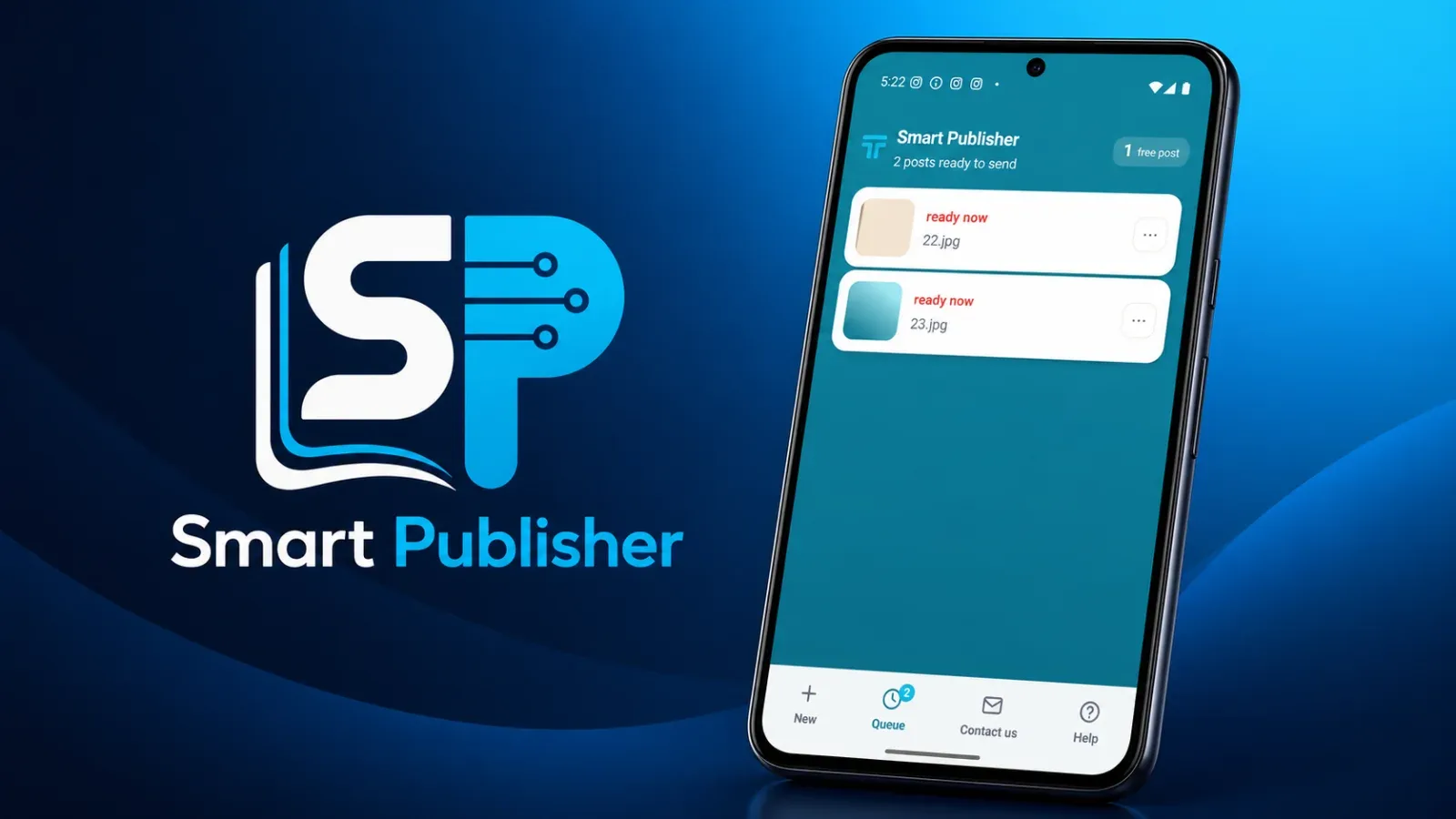
Prepared posts are no longer just items in a read-only list. From the menu beside each post, users can change the caption or scheduled time, or remove the item from the queue when it is no longer needed.
The queue also keeps the media visible. A thumbnail and the scheduled state help users recognize each item without opening it first. In the current Android build, the queue presents prepared posts as distinct cards, so the next action is clear at a glance.
A clearer record of what happened
A scheduled item should not simply disappear when its time passes. Smart Publisher distinguishes the outcomes that matter: sent, cancelled, and missed. This gives users a clearer record of what happened instead of forcing them to rely on memory.
That distinction is especially important because the Android app does not claim that opening Instagram is the same as publishing. As explained in our guide to the Smart Publisher Android handoff, the user still reviews and completes the final Share step inside Instagram.
Better video previews and easier support
Some video thumbnails were previously captured before a real frame was ready, producing an unhelpful black preview. The processing order was corrected so the thumbnail represents the selected content instead of an empty frame.
We also moved the contact route into the main navigation. If a user has a question while preparing or scheduling a post, finding support should not become another task.
The free plan should never feel like an ambush
Smart Publisher for Android includes a limited number of free posts before asking the user to consider a subscription. The remaining allowance is now shown as a persistent counter in the app header, where it can be understood before the next commitment.
The paywall itself was redesigned as a bottom sheet that keeps the app visible behind it. It explains the trial and the main benefits instead of replacing the entire experience with an abrupt wall. The goal is simple: users should know how much free use remains and what they receive if they continue.
Small changes, one clearer journey
Together, these improvements make the product more predictable. Users can recognize and edit prepared content, understand past outcomes, see a useful preview, reach support, and know the limit of the free plan.
You can learn more about the broader Smart Publisher product family. The Android app and the web product have different publishing boundaries, so we describe each version separately and only claim behavior we have verified.
A good update does more than add controls. It removes uncertainty. That is the common thread behind this release.

Ask a question
Got a question about this post? Drop your email and we’ll reply.
Get notified of new posts
1–2 emails a month on social media, AI and running a small business. No spam.
Related posts

Why Smart Publisher Needed Privacy and a Stable Technical Identity Before Google Play
Before Smart Publisher entered Google Play testing, we aligned its privacy page, permanent Android identity, and product history with what the app actually does.
Smart Publisher Schedules Now Survive Phone Restarts and App Updates
Testing the real Google Play bundle exposed a reliability issue: pending schedules could disappear after a restart or update. The fix is implemented and verified.
Smart Publisher Android Begins Its 14-Day Google Play Closed Test
Twelve testers are now opted in to Smart Publisher Android’s closed test. The required 14-day Google Play testing period is underway.